Build an AI Agent with Memory
AI agents need persistent memory to maintain context across conversations, remember user preferences, and build knowledge over time. Traditional databases require exact queries, but agents think in concepts and semantics.
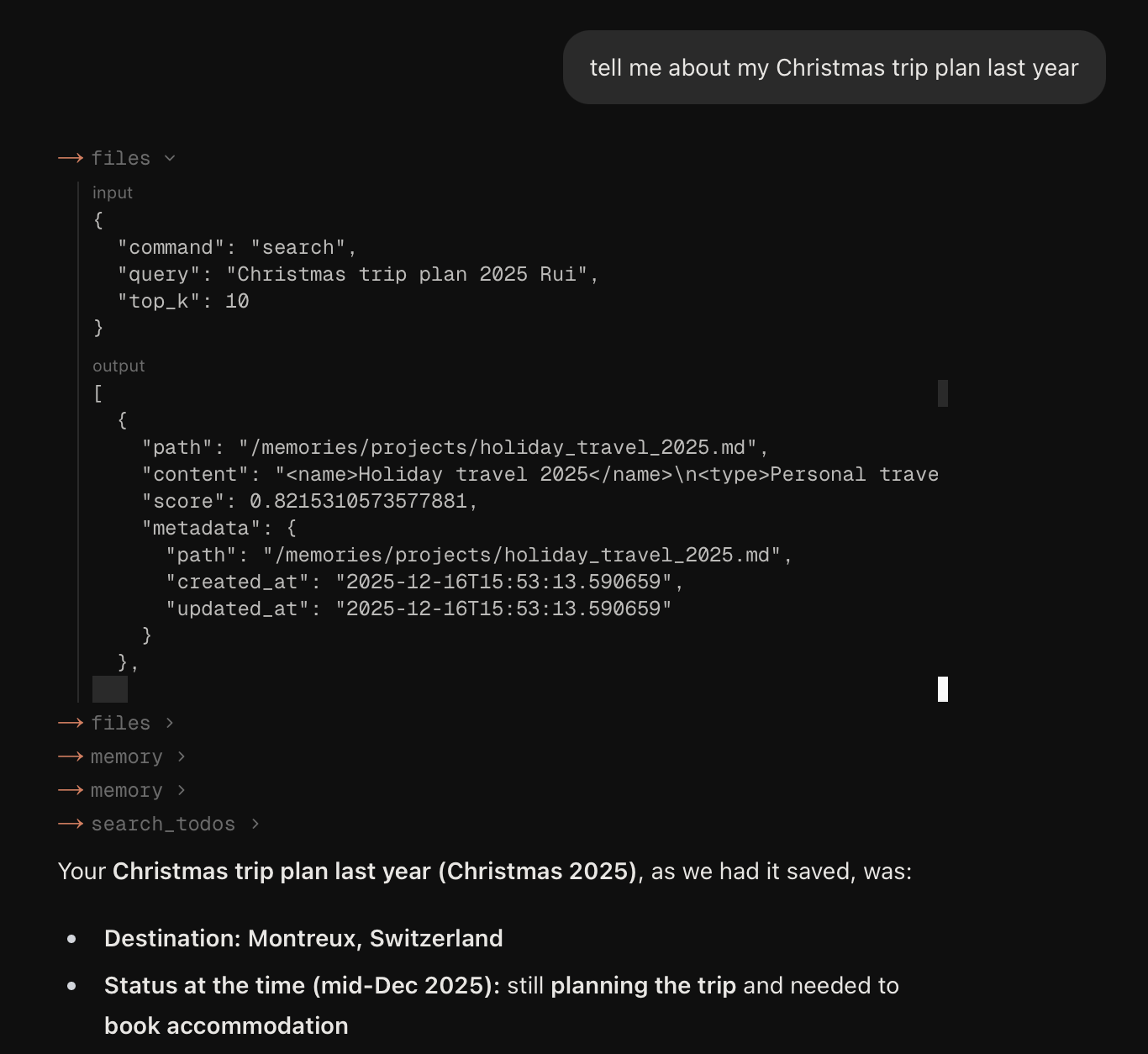
In this cookbook, we build a semantic file system for AI agents on top of Mixedbread stores. The agent can write memories as files, organize them into virtual folders, and retrieve relevant context through natural language search - giving your agent infinite, searchable memory.
Core: Semantic File SystemLink to section
Mixedbread stores can function as a semantic file system where:
- Paths as IDs - Use
external_idto store and retrieve files by path (e.g.,/memories/user.md) - Folders are virtual - Scope searches to "folders" with prefix filters on path metadata
- Search is semantic - Find memories using natural language with store search
# Virtual folder view
/memories/
  user.md
  people/
    alice.md

# Stored as flat files with path-based IDs
{
  external_id: "/memories/user.md",
  metadata: { path: "/memories/user.md" }
}
{
  external_id: "/memories/people/alice.md",
  metadata: { path: "/memories/people/alice.md" }
}
Prerequisites & SetupLink to section
Before you begin, make sure you have:
- API Key: Get your API key from the API Keys page
- SDK: Install the Mixedbread SDK for your preferred language:
pip install mixedbread- For the Agent Integration section, you'll need an OpenAI API key:
export OPENAI_API_KEY="your-openai-api-key"pip install openaiDefine the SemanticFS ClassLink to section
Wrap all operations in a SemanticFS class that provides file system-like methods:
from mixedbread import Mixedbread

class SemanticFS:
  """A semantic file system backed by Mixedbread stores."""

  def __init__(self, store_name: str, api_key: str = None):
      self.mxbai = Mixedbread(api_key=api_key)
      self.store_name = store_name
      self.mxbai.stores.create(name=store_name)

  def write(self, path: str, content: str, metadata: dict = None):
      """Write content to a path."""
      file_metadata = {"path": path, **(metadata or {})}
      filename = path.split("/")[-1]
      self.mxbai.stores.files.upload(
          store_identifier=self.store_name,
          file=(filename, content, "text/plain"),
          external_id=path,
          metadata=file_metadata,
          overwrite=True
      )

  def read(self, path: str) -> str | None:
      """Read content from a path."""
      try:
          file = self.mxbai.stores.files.retrieve(
              store_identifier=self.store_name,
              file_identifier=path
          )
          content = self.mxbai.files.content(file_id=file.id)
          return content.read().decode("utf-8")
      except Exception:
          return None

  def search(self, query: str, folder: str = None, top_k: int = 5) -> list[dict]:
      """Semantic search across files, optionally within a folder."""
      filters = {"key": "path", "operator": "starts_with", "value": folder} if folder else None
      results = self.mxbai.stores.search(
          store_identifiers=[self.store_name],
          query=query,
          filters=filters,
          top_k=top_k
      )
      return [{"path": r.metadata.get("path"), "content": r.text, "score": r.score} for r in results.data]

  def list(self, folder: str) -> list[str]:
      """List all files under a folder."""
      files = self.mxbai.stores.files.list(
          store_identifier=self.store_name,
          metadata_filter={"key": "path", "operator": "starts_with", "value": folder}
      )
      return [f.metadata.get("path") for f in files.data]

  def delete(self, path: str):
      """Delete a file by path."""
      self.mxbai.stores.files.delete(
          store_identifier=self.store_name,
          file_identifier=path
      )

# Initialize
fs = SemanticFS("agent-memory", api_key="YOUR_API_KEY")
Method ReferenceLink to section
write(path, content, metadata?)- Store content at a path. Usesexternal_idfor upsert behavior.read(path)- Retrieve file content by exact path.search(query, folder?, top_k?)- Semantic search across files, optionally scoped to a folder.list(folder)- List all file paths under a folder prefix.delete(path)- Remove a file by path.
Usage ExamplesLink to section
# Write files
fs.write("/memories/user.md", """# User Profile
- Name: Alice
- Role: Software Engineer
- Interests: AI, distributed systems
""", {"type": "profile"})

fs.write("/chats/2024-01-15.md", """# Chat - January 15
Discussed Redis caching strategy.
""", {"type": "chat", "date": "2024-01-15"})

# Read a specific file
profile = fs.read("/memories/user.md")

# Semantic search
results = fs.search("caching strategy")
results = fs.search("auth tokens", folder="/chats/")

# List files in a folder
chats = fs.list("/chats/")

# Delete a file
fs.delete("/chats/2024-01-10.md")
Build an Agent with MemoryLink to section
Now let's integrate SemanticFS with an AI agent:
- Initialize a
SemanticFSinstance - Define tools that wrap the
fsmethods - Create an agent with the tools attached
We use the OpenAI Responses API for Python and AI SDK for TypeScript:
import json
from openai import OpenAI
from datetime import datetime

# Initialize SemanticFS (from previous section)
fs = SemanticFS("agent-memory", api_key="YOUR_MIXEDBREAD_API_KEY")

# Initialize OpenAI client
client = OpenAI()

# Define tools as OpenAI function schemas
tools = [
  {
      "type": "function",
      "name": "search",
      "description": "Search memories using natural language.",
      "parameters": {
          "type": "object",
          "properties": {
              "query": {"type": "string", "description": "Natural language search query"},
              "folder": {"type": "string", "description": "Optional folder to search within (e.g., '/chats/', '/memories/')"}
          },
          "required": ["query"]
      }
  },
  {
      "type": "function",
      "name": "read",
      "description": "Read a specific file by path.",
      "parameters": {
          "type": "object",
          "properties": {
              "path": {"type": "string", "description": "Path to read (e.g., '/memories/user.md')"}
          },
          "required": ["path"]
      }
  },
  {
      "type": "function",
      "name": "write",
      "description": "Save content to a file path.",
      "parameters": {
          "type": "object",
          "properties": {
              "path": {"type": "string", "description": "Path to store the file"},
              "content": {"type": "string", "description": "Content to save"}
          },
          "required": ["path", "content"]
      }
  },
  {
      "type": "function",
      "name": "list_files",
      "description": "List all files in a folder.",
      "parameters": {
          "type": "object",
          "properties": {
              "folder": {"type": "string", "description": "Folder path (e.g., '/chats/')"}
          },
          "required": ["folder"]
      }
  }
]

# Tool handlers
handlers = {
  "search": lambda args: fs.search(args["query"], args.get("folder"))[:3],
  "read": lambda args: fs.read(args["path"]) or "File not found",
  "write": lambda args: (fs.write(args["path"], args["content"]), f"Saved to {args['path']}")[1],
  "list_files": lambda args: fs.list(args["folder"])
}

def chat(user_message: str, max_iterations: int = 10) -> str:
  """Run the agent loop with memory."""
  user_profile = fs.read("/memories/user.md") or "No user profile yet."

  instructions = f"""You are a helpful assistant with persistent memory.

User Profile:
{user_profile}

Today's date: {datetime.now().strftime('%Y-%m-%d')}"""

  input_list = [{"role": "user", "content": user_message}]

  for _ in range(max_iterations):
      response = client.responses.create(
          model="gpt-4.1",
          instructions=instructions,
          tools=tools,
          input=input_list
      )

      input_list.extend(response.output)

      # Check for function calls
      has_function_calls = False
      for item in response.output:
          if item.type == "function_call":
              has_function_calls = True
              args = json.loads(item.arguments)

              handler = handlers.get(item.name)
              result = handler(args) if handler else {"error": f"Unknown function: {item.name}"}

              input_list.append({
                  "type": "function_call_output",
                  "call_id": item.call_id,
                  "output": json.dumps(result, default=str)
              })

      if not has_function_calls:
          return response.output_text

  return "Max iterations reached."

# Example usage
response = chat("What caching strategy did we discuss last time?")
print(response)
Organize with FoldersLink to section
On top of SemanticFS, use folders to let agents organize different types of content:
/memories/user.md- User profile loaded into system prompt (preferences, name, role)/memories/people/- Information about contacts (details about Alice, Bob)/chats/- Conversation summaries by date (key decisions, action items)/notes/- User-created documents (project ideas, meeting notes)/todos/- Task items and reminders (pending tasks with due dates)
Next StepsLink to section
You now have the building blocks for AI agents with infinite memory. See Bernd for a full implementation with calendar, todos, and web search:
Try Bernd
Live demo of an agent with persistent memory
Bernd on GitHub
Full source code and implementation details
ReferencesLink to section
- OpenAI Responses API - Python agent loop pattern used in this cookbook
- AI SDK ToolLoopAgent - TypeScript agent framework used in this cookbook
- Metadata Filtering - Advanced filtering for precise memory retrieval