Chat with PDFs
If you have a lot of documents like PDFs and slides in the company knowledge base, you might want to find a specific page or figure by describing it.
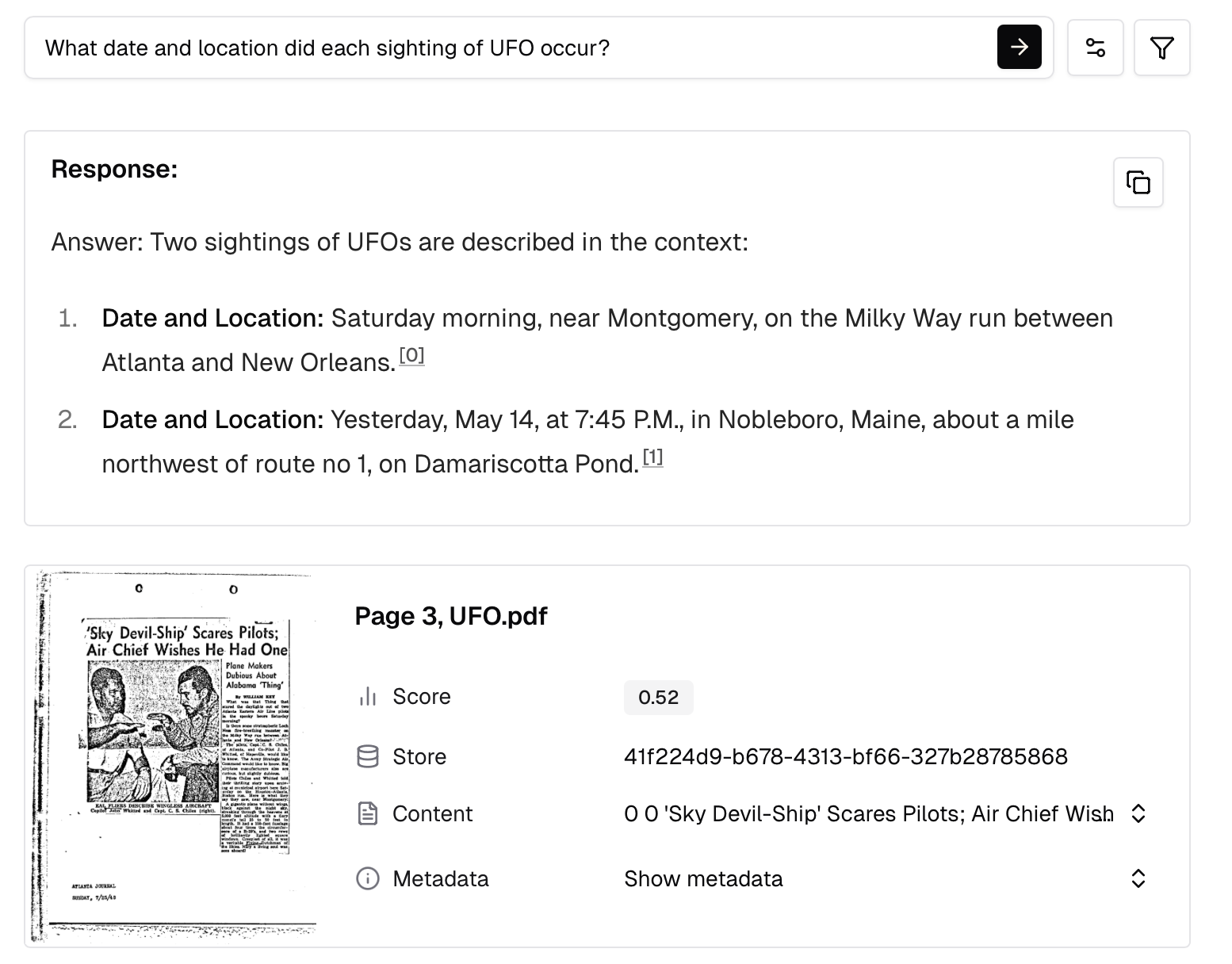
In this cookbook, we build a document search engine with Q&A using Mixedbread. It shows rich document support (PDFs, scanned files, PPTX), high quality parsing and native question answering - everything you need to find and chat with your documents.
Prerequisites & SetupLink to section
Before you begin, make sure you have:
- API Key: Get your API key from the API Keys page
- SDK: Install the Mixedbread SDK for your preferred language:
pip install mixedbread- (Optional) For the RAG with OpenAI section, you'll need an OpenAI API key and the OpenAI SDK:
pip install openaiGet Sample DocumentsLink to section
We'll use a sample of 3 documents (PDFs, scanned files, and PPTX). Download and extract:
curl -L -o doc-qa-sample.zip https://github.com/mixedbread-ai/cookbook-assets/releases/download/v1.0.0/doc-qa-sample.zip
unzip doc-qa-sample.zip
The sample includes:
attention.pdf- 3 PDF pages from the paper "Attention Is All You Need"UFO.pdf- 3 PDF pages of a scanned UFO document released by FOIAOBGYN.pptx- 3 PPTX pages from a RCSI presentation on Obstetrics and Gynecology
Create a StoreLink to section
First, create a Mixedbread store for your documents:
from mixedbread import Mixedbread

mxbai = Mixedbread(api_key="YOUR_API_KEY")

store = mxbai.stores.create(
  name="doc-qa-cookbook"
)
Upload DocumentsLink to section
Upload your PDFs and slides:
from pathlib import Path

for filename in ["attention.pdf", "UFO.pdf", "OBGYN.pptx"]:
  mxbai.stores.files.upload(
      store_identifier="doc-qa-cookbook",
      file=Path(filename)
  )
  print(f"Uploaded: {filename}")
(Optional) High Quality ParsingLink to section
Search works on visual content (screenshots of pages) directly - Mixedbread stores can find relevant pages regardless of quality.
For downstream tasks, Mixedbread stores return image chunks per page with image_url and ocr_text fields. When LLMs don't support images or struggle with complex visuals, you can use ocr_text field to provide more context.
Enable high quality parsing to automatically get better OCR text:
mxbai.stores.files.upload(
  store_identifier="doc-qa-cookbook",
  file=Path(filename),
  config={
      "parsing_strategy": "high_quality",
  }
)- Fast (default): Standard PDF text extraction, fast and efficient
- High quality: Runs advanced OCR to extract cleaner, more accurate text
Search DocumentsLink to section
Once your documents are uploaded and indexed, search using natural language:
results = mxbai.stores.search(
  store_identifiers=["doc-qa-cookbook"],
  query="architecture diagram showing the transformer model layers",
  top_k=1
)

for result in results.data:
  print(f"{result.score:.3f} - {result.filename}")
  print(f"  {result.ocr_text[:200]}...")
Try searching for content in the scanned UFO document or the RCSI slides:
ufo_results = mxbai.stores.search(
  store_identifiers=["doc-qa-cookbook"],
  query="Eastern Air Line pilots UFO sighting",
  top_k=1
)

rcsi_results = mxbai.stores.search(
  store_identifiers=["doc-qa-cookbook"],
  query="Acceptable MCA Doppler shift waveform",
  top_k=1
)
Build Q&A with LLMsLink to section
Now for the main event: getting AI-powered answers from your documents.
Native Question AnsweringLink to section
Mixedbread stores provide question answering capabilities out of the box:
response = mxbai.stores.question_answering(
  store_identifiers=["doc-qa-cookbook"],
  query="What date and location did each sighting of UFO occur?",
  top_k=2
)

print("Answer:", response.answer)
print("\nSources:")
for i, source in enumerate(response.sources):
  print(f"  [{i}] {source.filename} - {source.ocr_text[:200]}...")
The response includes:
answer: AI-generated answer with citation tags like<cite i="0"/>sources: The document chunks used to generate the answer
Citations map directly to sources - <cite i="0"/> refers to sources[0].
RAG with OpenAILink to section
Want more control? Use Mixedbread stores for retrieval and OpenAI or other LLM providers for generation:
- Retrieve - Call Mixedbread to search documents with your query
- Build context - Convert chunks to messages with image URLs and OCR text
- Generate - Call the LLM with the query and context to get an answer
from openai import OpenAI

openai = OpenAI(api_key="YOUR_OPENAI_KEY")

# Step 1: Retrieve relevant context from Mixedbread
query = "Explain the self-attention mechanism"

results = mxbai.stores.search(
  store_identifiers=["doc-qa-cookbook"],
  query=query,
  top_k=2
)

# Step 2: Build multimodal content with images and text
content = [{"type": "input_text", "text": f"Question: {query}\n\nHere are the relevant document pages:"}]

for i, r in enumerate(results.data):
  # Add the page image for visual context
  content.append({
      "type": "input_image",
      "image_url": r.image_url.url
  })
  # Add OCR text and source info
  content.append({
      "type": "input_text",
      "text": f"[Source {i}: {r.filename}]\n{r.ocr_text}"
  })

# Step 3: Generate answer with OpenAI Responses API
response = openai.responses.create(
  model="gpt-5",
  instructions="Answer questions based on the provided document pages. Cite sources when possible.",
  input=content
)

print(response.output_text)
This pattern gives you full control over:
- The prompt template and system message
- Which model to use (GPT-5, Claude, etc.)
- How to format and present citations
- Streaming responses
Next StepsLink to section
You now have a working document Q&A system. Here are ways to extend it:
- Add more documents: Upload your own PDFs, Word docs, or presentations
- Filter by metadata: Create document collections by topic, date, or author
- Build a chat interface: Create a conversational UI with chat history